The Cookie Banner Was Always Optional
I wanted visitor stats without a consent banner. The trick wasn't a clever cookie. It was deleting the JavaScript: Caddy logs the requests, masks the IP at the edge, and GoAccess turns the log into a dashboard. No cookies, no third party, no banner.
I wanted visitor stats without a consent banner. The trick wasn't a clever cookie. It was deleting the JavaScript: Caddy logs the requests, masks the IP at the edge, and GoAccess turns the log into a dashboard. No cookies, no third party, no banner.
TL;DR: You don't need a cookie banner to know which pages people read. Banners exist because trackers store something on the device; if you store nothing, there's nothing to consent to. So my analytics stores nothing in your browser: Caddy writes an access log with the visitor IP already masked (
ip_mask, last octet zeroed), GoAccess turns that log into a dashboard served behind basic-auth at/_stats, and the one in-browser script I did end up adding (self-hosted Umami, a few days later) writes nothing to the device either. Two gotchas the demos skip: Caddy logs the IP in two fields, and GoAccess's report needs'unsafe-eval', both fixable in theCaddyfile.
Every analytics tutorial opens the same way: drop this <script> in your <head>, then bolt on a consent banner so you're allowed to. The banner is the part nobody wants: the modal, the "Reject all" dark-pattern hunt, the legal copy you paste from a generator and never read.
So I asked the dumb question. Why is the banner there at all?
The banner was never about cookies
Consent banners come from the ePrivacy Directive, not the GDPR/RGPD itself, and ePrivacy is specific: you need consent to store or read information on the user's device. Cookies, localStorage, a fingerprint stashed in IndexedDB, anything that touches the terminal in front of the visitor.
Flip that around and the exemption is obvious. Store nothing on the device, and there's nothing to ask permission for. No banner. Not as a loophole: there's simply no storage event to consent to.
There's one catch, and it's the GDPR half: an IP address is personal data. So "store nothing on the device" gets you out of the banner, but you still can't sit on a pile of raw IPs and call it private. You have to not keep the identifying part. That single constraint decides the whole architecture.
Delete the JavaScript instead
Here's the move: the thing that already sees every request — the web server — also already knows how to write down what it saw. My site runs behind Caddy, so the entire "tracker" is a log block.
log {
	output file /logs/access.log {
		roll_size 10MiB
		roll_keep 5
		roll_keep_for 720h
	}
	format filter {
		wrap json
		fields {
			request>remote_ip ip_mask { ipv4 24  ipv6 32 }
			request>client_ip ip_mask { ipv4 24  ipv6 32 }
		}
	}
}
The load-bearing word is ip_mask. It zeroes the last octet of every IPv4 address (and the low bits of IPv6) before the line is written to disk. 81.246.12.137 becomes 81.246.12.0. The masking happens at the edge, so a full IP never lands in a file, never sits in a backup, never waits around to be subpoenaed. The raw log is born anonymous.
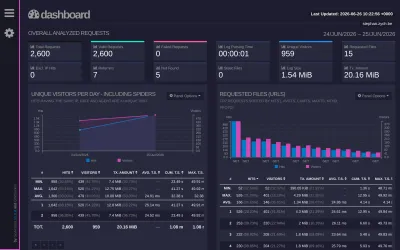
Then GoAccess reads that log and renders a dashboard (visitors, top pages, referrers, browsers, status codes, bandwidth). It ships a predefined Caddy format, so pointing it at the log is one flag:
goaccess /logs/access.log -o /logs/report.html --log-format=CADDYI run it on a loop in a tiny sidecar container and let Caddy serve the resulting report.html behind HTTP basic-auth at /_stats. No database, no SaaS, no second domain, no script on the page. The dashboard looks like this:
Mask the IP twice, or you've masked nothing
Here's the first thing the tidy version above won't tell you. I masked remote_ip, congratulated myself, and then checked the actual log line:
"remote_ip": "172.29.0.0",
"client_ip": "172.29.0.1"
Caddy emits the client address in two fields. remote_ip is the socket peer; client_ip is the resolved client after any trusted proxies, and GoAccess reads client_ip. So masking only the first field gave me a log that looked anonymized, a dashboard that displayed the real IP, and a false sense of security. Mask both, or you've masked neither. (That second request>client_ip line above is doing the real work.)
This is the kind of bug you only catch by reading a raw log line instead of trusting the config to mean what you hoped. I caught it because I looked.
What logs can and can't tell you
Server logs aren't a free lunch. They genuinely can't see anything that happens in the browser, because nothing in the browser is reporting back. That's the whole point, and it's also the limitation:
| You get | You don't |
|---|---|
| Page & asset hits, over time | Bounce rate, scroll depth |
| Top pages, referrers, status codes | Real session duration |
| Browser / OS family, bandwidth | Screen size, device pixels |
| Crawler vs human-ish traffic | Reliable new-vs-returning visitors |
| Approximate unique visitors | Per-user funnels & events |
"Approximate" is load-bearing. With the last octet masked and no cookie to glue requests together, a "unique visitor" is a heuristic over a masked IP and a user-agent, not a person you can follow across days. That's not a defect to apologize for. It's the deal. The fuzziness is why there's no banner. If you need to know that user #4837 came back on Tuesday and rage-quit the checkout, this isn't your tool, and you're going to be clicking "Reject all" on your own site.
The strict-CSP gotcha the demos skip
Second thing nobody mentions: GoAccess's report renders client-side, and its bundled JavaScript uses eval. My site ships a deliberately strict Content-Security-Policy (script-src 'self', no 'unsafe-eval', no exceptions). So the report loaded, spun its little loading spinner, and dead-ended on NO AUTHENTICATION PROVIDED. with a console error:
EvalError: Evaluating a string as JavaScript violates the following
Content Security Policy directive ... 'unsafe-eval' is not an allowed source
I did not want to punch 'unsafe-eval' into my global policy to satisfy one internal page. The fix is to scope the relaxation to the stats route only. The public site keeps its strict CSP, and the auth-gated /_stats path gets its own loosened one:
handle /_stats* {
	basic_auth { ... }
	header Content-Security-Policy "default-src 'self'; \
		script-src 'self' 'unsafe-inline' 'unsafe-eval'; \
		style-src 'self' 'unsafe-inline'; img-src 'self' data:; font-src 'self' data:"
	# ... serve report.html
}
handle blocks make this clean: one path, one policy, no leakage into the pages real visitors actually see.
The two sites that can't read a log
GoAccess works because Caddy sees every request to this site. But I run two siblings (my company site and a game-studio site) as static builds on GitHub Pages. No Caddy there, no access log to mask, nothing to point GoAccess at. So does the banner come back?
No, because the rule was never "no JavaScript," it was store nothing on the device. "Delete the script" is just the cleanest way to honour that when you own the server. When you don't, you can ship a script that still stores nothing. That's Umami: cookieless by default (no cookies, no localStorage, no fingerprint), so the same ePrivacy exemption applies. No banner, for the same reason as before.
The nice part is I don't hand my visitors to anyone. Umami is self-hosted: one more container next to this site, its own Postgres, reverse-proxied by the same Caddy at analytics.zych.be. Cookieless, single-domain, mine.
{$ANALYTICS_ADDRESS} {
	reverse_proxy umami:3000
}
Each site adds one tag (no cookie code, no consent state to manage):
<script defer src="https://analytics.zych.be/script.js"
        data-website-id="…"></script>
That one script is allowed to exist because of what it refuses to do. It sets no cookie and writes nothing to localStorage; to tell two visitors apart it asks the server to hash the day's rotating salt together with the IP and user-agent, then throws that hash away and regenerates it every night. So Umami can separate two visits today and has no way to know they were the same person yesterday: the raw IP is never stored, the same constraint the masked log enforces from the other end.
What you buy with that beacon is everything a server log structurally can't see: the entire "you don't" column from the table above. It runs in the browser, so it reports what the browser knows:
| Umami adds (runs in-browser) | Still won't tell me |
|---|---|
| Screen size & device class | Who you are across days |
| Real referrers & UTM tags | A cookie'd cross-site identity |
| Bounce rate & visit duration | Anything after you close the tab |
| Custom events you choose to fire | A name, email, or account |
| Entry/exit pages & per-visit journeys | A fingerprint to re-find you with |
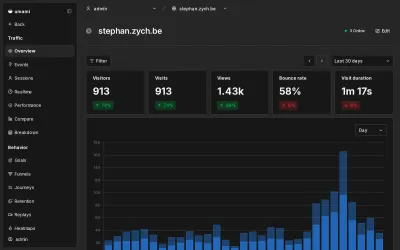
I point this site at it too, so all three land in one dashboard. GoAccess stays. It reads server-side truth (crawlers, every request, zero JS) that a beacon can't, and it costs nothing to keep. So I run both: logs for the ground truth, Umami for the human-readable view across sites that don't share a server. Two methods, one rule: nothing stored on the device, so nothing to consent to.
Worth it?
For a personal site? Completely. I get a dashboard that answers the only questions I actually had (which posts get read, where do readers come from) with no banner insulting my visitors, no third party in the request path, and no analytics tax on page load. The cost is a log block, a sidecar container, and accepting that my visitor counts are honest-but-fuzzy.
The banner was always optional. It's just that "drop in this script" is easier to write a tutorial about than "delete the script and read your logs." If you want the exact privacy posture this produces, it's spelled out on my privacy page, which, fittingly, has nothing to opt out of.
References: Caddy log directive and the ip_mask log filter; GoAccess; the CNIL guidance on consent-exempt audience measurement. The IP-masking and CSP gotchas are from my own Caddyfile, learned the way most things are, by checking what actually happened instead of what I assumed.